

Shopify store traffic checker: find the stores that are growing
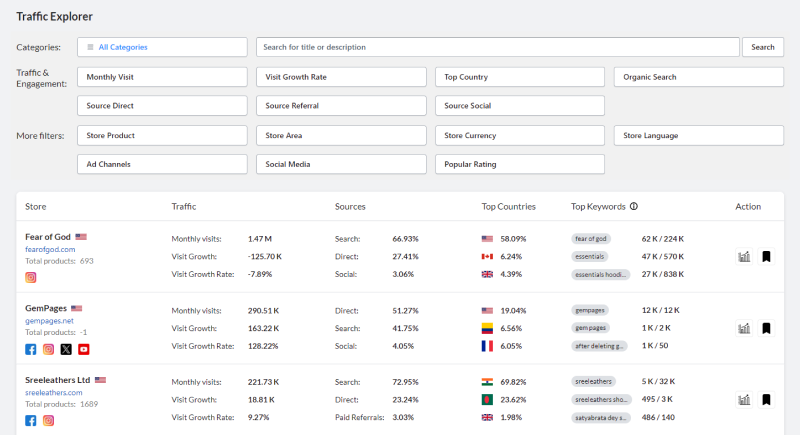
See how many visits Shopify stores get each month, how fast they grow, which countries the visitors come from and which channels and keywords bring them. Filter stores by traffic to follow the ones that are taking off.
Free plan with 1,500 credits a month · No credit card needed
Why check a Shopify store's traffic?
Traffic is the closest public signal to sales. A store whose visits grow month after month is doing something right: a product, an ad, a channel. A store with hundreds of products and no traffic is a warning, not a model.
Traffic Explorer estimates the traffic of Shopify stores and breaks it down by source and country. Use it to pick the competitors worth studying, to see which channel works in your niche and to find the keywords that bring visitors.
What you can do with Traffic Explorer
Monthly visits and growth
See the visits of each store and how fast they grow, to follow the stores that are rising.
Top countries
Know where a store's visitors come from and keep the stores of your market.
Traffic sources
Search, direct, referrals, social, mail and paid referrals: see which channel feeds each store.
Top keywords
The keywords that bring visitors to a store, with their traffic and search volume.
Filter by traffic
Filter stores by monthly visits, growth rate, top country and by the share of search, direct, referral or social traffic.
Engagement
Bounce rate, pages per visit and visit duration in the store detail, next to its visits over time.
How to check a Shopify store's traffic in 4 steps
Filter by visits and growth
Keep the stores with real traffic and a positive trend.
Pick your market
Filter by top country to compare the stores that sell where you sell.
Read the source mix
Mostly social traffic points to ads and influencers; mostly search traffic points to SEO and Google Shopping.
Dig into the store
Open the store detail for its keywords, countries and engagement, then its products in Store Research.
When to use Traffic Explorer
Choosing competitors to study
Spend your time on the stores that are growing, not on the ones that were big two years ago.
Choosing a marketing channel
See whether the stores of your niche win with social, search or referrals before you invest.
Finding SEO keywords
Reuse the keywords that already bring visitors to stores like yours.


Frequently asked questions
How accurate is the traffic data?
Traffic figures are estimates, like those of every third-party traffic tool. Use them to compare stores and to follow trends rather than as exact numbers.
Can I check the traffic of any Shopify store?
Traffic Explorer covers the Shopify stores in the AliSun database. With the free Chrome extension, you also see the traffic overview of a Shopify store while you visit it.
What is a good monthly traffic for a Shopify store?
It depends on the niche and the price of the products. Compare a store with the others of the same niche and country, and watch the trend: steady growth matters more than a big number.
Is Traffic Explorer free?
Yes. Every tool, this one included, works on the free plan with 1,500 credits every month and no credit card. Each search result uses 1 credit and opening a detail uses 2. Paid plans start at $6.9/month when you need more searches, see pricing.
More AliSun tools
Every plan includes every tool, the free plan too.
Product Research
See what Shopify stores sell, compare with Amazon, eBay and Etsy, and find the AliExpress source.
Dropshipping Products
AliExpress products with their orders, sales by country, buyers and the stores already selling them.
Video Dropshipping
AliExpress products that come with a video, ready for TikTok, Reels and Facebook ads.
Store Research
Spy on Shopify stores: products, theme, social accounts, ad channels and traffic.
Store Themes
Real Shopify stores grouped by the theme they use, for your next store design.
Ads Spy
Facebook ads by keyword, country and language, with their text, media and start date.
Profit Calculator
Free: profit per order, margin, break-even ad cost and ROAS of a dropshipping product.
Try Traffic Explorer for free
1,500 free credits every month for every tool. Paid plans from $6.9/month.
Start freeNo credit card needed