

Shopify store spy: see how your competitors sell
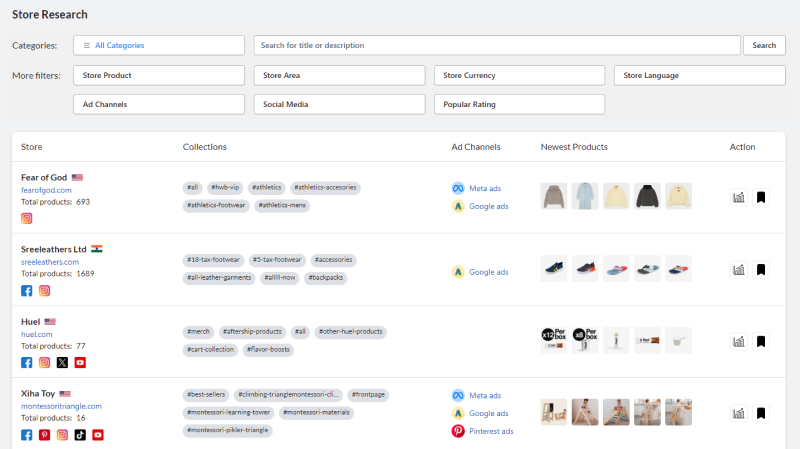
Find the Shopify stores in your niche and see what they show the world: their products and best product types, their theme, social accounts and ad channels, and how much traffic they get. Filter by country, language, currency, number of products and traffic.
Free plan with 1,500 credits a month · No credit card needed
What can you learn from a competitor's Shopify store?
A Shopify store that already sells in your niche is a free lesson. Its catalogue shows the products and price points it bets on, its newest products show what it is testing, and its social accounts and ad channels show where its customers come from.
Store Research collects this information for Shopify stores, so you can compare dozens of competitors in the time it takes to visit one. Open a store to see its full product list, its top product types, vendors and tags, its theme, its traffic over time and similar stores.
What you can do with Store Research
Filter stores your way
By country, language, currency, number of products and creation date, or search store titles and descriptions.
Social media and ad channels
See which stores are on Facebook, Instagram, TikTok, Pinterest, YouTube or Twitter, and which advertise on Facebook.
Newest products
See the latest products a store added: the best clue to what it is testing right now.
Product analytics
Top 5 product types, vendors and tags of a store, and its full product list with prices.
Traffic in the same place
Monthly visits, growth, bounce rate, pages per visit, visit duration, top countries, traffic sources and keywords.
Similar stores
From one good competitor, find the other stores like it.
How to spy on Shopify stores in 4 steps
Define your market
Filter by the country, language and currency you sell in, and search your niche in store titles and descriptions.
Keep the active stores
Use the traffic filters (monthly visits, growth) to drop the stores nobody visits.
Open the store detail
Read its products, product types, theme, social accounts, ad channels and traffic sources.
Turn it into a plan
Note the price points, the products to test and the channels to use, then check their ads in Ads Spy.
When to use Store Research
Before you choose a niche
See how many stores sell in it, how big they are and whether new stores still grow.
Before you launch a product
Check who sells it, at what price, with which theme and on which channels.
To follow competitors
Come back regularly to see the new products and the traffic trend of the stores you watch.

Frequently asked questions
Can I see a Shopify store's sales?
No tool can see the real sales of a Shopify store; only its owner can. AliSun shows the public signals that come closest: traffic and its trend, products and their prices, the newest products and the ad channels.
Is it legal to spy on Shopify stores?
AliSun shows information that stores publish themselves (products, prices, theme, social links) plus traffic estimates. Use it to learn from the market, never to copy a store's brand, texts or photos.
How do I find which theme a Shopify store uses?
Open the store in Store Research: the theme name is listed with the store information. Store Themes then shows the other stores using the same theme.
Is Store Research free?
Yes. Every tool, this one included, works on the free plan with 1,500 credits every month and no credit card. Each search result uses 1 credit and opening a detail uses 2. Paid plans start at $6.9/month when you need more searches, see pricing.
Can I see the same data while I browse a store?
Yes. With the free Chrome extension, any Shopify store you visit shows its traffic, social media, ad channels and products.
More AliSun tools
Every plan includes every tool, the free plan too.
Product Research
See what Shopify stores sell, compare with Amazon, eBay and Etsy, and find the AliExpress source.
Dropshipping Products
AliExpress products with their orders, sales by country, buyers and the stores already selling them.
Video Dropshipping
AliExpress products that come with a video, ready for TikTok, Reels and Facebook ads.
Traffic Explorer
Monthly visits, growth, countries, traffic sources and keywords of Shopify stores.
Store Themes
Real Shopify stores grouped by the theme they use, for your next store design.
Ads Spy
Facebook ads by keyword, country and language, with their text, media and start date.
Profit Calculator
Free: profit per order, margin, break-even ad cost and ROAS of a dropshipping product.
Try Store Research for free
1,500 free credits every month for every tool. Paid plans from $6.9/month.
Start freeNo credit card needed